
How it works
How to Watch Instagram Stories Anonymously
Use our free Instagram story viewer to view and watch Instagram stories anonymously — no login, no account, no trace left behind. Works on any device in seconds.
You never share an Instagram account or password. Just enter a public username and watch.
Your name never appears in the account's viewer list — the owner has no way to know you watched.
3 Steps to View Instagram Stories Anonymously
From a username to watching Instagram stories anonymously in under 10 seconds.
- 1
Enter an Instagram username or profile link
Go to IG Story Viewer and type the username of the public Instagram account you want to watch. You can also paste the full profile link directly — either format works. No Instagram account or login required.
- 2
Watch Instagram stories anonymously
The active stories load instantly in your browser. Watch them the same way you would in the Instagram app — tap or click through each one. You remain completely anonymous: your name never appears in the account's viewer list, and the owner receives no notification.
- 3
Download any story before it expires
Instagram stories disappear after 24 hours. If there is a story you want to keep, tap the download button to save it to your device in full quality. Video stories save as .mp4 and photos as .jpg — no watermark, no quality loss.
What anonymous viewing actually looks like
When you watch inside the Instagram app, your username lands on the account owner's viewer list — the panel below is exactly what they see. Viewing through a browser-based tool keeps your name off that list entirely.
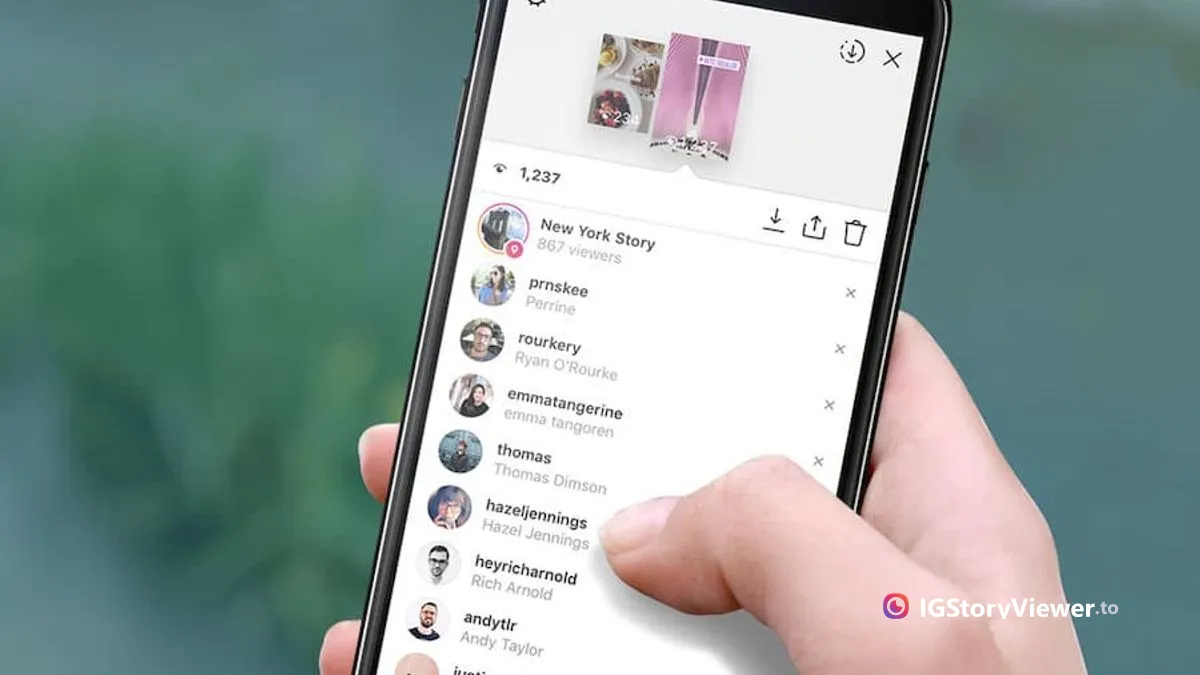
In-app vs. anonymous viewer
The difference comes down to one thing: whether your name lands on their list.
Watching in the Instagram app
- Your username is added to the owner's viewer list
- Requires you to be logged in to your own account
- The account can see you watched — every time
Watching with IG Story Viewer
- Your name never appears on the viewer list
- No login, no account, nothing to install
- The owner is never notified that you watched
What you can and can't do
An honest look at what a browser-based story viewer does — and where its limits are.
What it can do
- View any public account's active stories anonymously
- Browse public highlights without leaving a trace
- Download stories in full quality before they expire
- Work on iPhone, Android, tablet, and desktop
What it can't do
- Open stories from private accounts you don't follow
- Show who viewed someone else's story
- Recover a story that already expired 24 hours ago
- Bypass Instagram's rules or reveal hidden data
Tips for using the Instagram story viewer
Only public Instagram accounts can be viewed — private accounts are not accessible through any anonymous story viewer.
If a profile shows no stories, they may not have posted one in the last 24 hours. Instagram stories expire automatically.
You can also browse Instagram highlights anonymously — switch to the Highlights tab after entering a username.
IG Story Viewer works on iPhone, Android, tablet, and desktop — no app to install, no extension needed.
Ready to watch Instagram stories anonymously?
Enter any public username and start viewing Instagram stories instantly — free, no login, no account needed.